

Every business today relies on technology. Whether you take orders online, manage inventory, schedule appointments, or communicate with customers, your systems must work when you need them.
When they don’t, that’s called downtime and it can cost companies, especially small to medium-sized businesses money, customers, and your reputation.
We break down what downtime really means and preventative measures for your business to remain productive and profitable.
Downtime occurs when your networks, systems, or applications stop working or slow down, affecting your team’s productivity. An outage can impact customer interactions, internal operations, or both. Even a short disruption can become expensive.
While occasional downtime is unavoidable, what’s important is how quickly and effectively your business can respond and recover from it.
When systems fail, the impact spreads quickly. Your entire business is affected, from lost sales and productivity to failing compliance requirements. The main concerns include:
Frustrated customers: In a world where people expect fast service, even a short outage can make customers lose trust and/or patience and go to a competitor.
Lost sales and productivity: Customers can’t place orders or make payments. Your team can’t work, and every minute down is lost revenue.
Reputation damage: A reputation for being unreliable and slow can stick with customers long after the issue is fixed, especially if it’s reoccurring.
Understanding what causes downtime is the first step towards preventing unplanned disruptions and faster recovery. Knowing where vulnerabilities lie helps businesses strengthen their defenses and maintain uptime.
Equipment failures: Servers, phones, and network devices can fail due to overload, poor configuration, or age. Software issues like failed updates can crash systems or corrupt data.
Power outages: Organizations that depend on on-premises infrastructure face greater risk during outages without backup power or cloud support. Backup power and cloud-based solutions help maintain access during outages.
Cyberattacks: Ransomware, phishing, and other attacks can lead to system lock outs, corrupt data, and shut operations down for hours or even days. As the cyberthreat landscape continues to grow, small businesses remain a key target. This makes security and recovery planning more critical than ever. A well-defined incident response plan can help you prepare for threats, respond quickly, and protect your business continuity.
Human error: Simple mistakes like deleting the wrong file or poorly managed updates can trigger outages.
Weather and disasters: Natural disasters like storms, floods, and fire can damage equipment and disrupt power. Cloud backups, off-site recovery systems, and disaster recovery plans can ensure continuity.
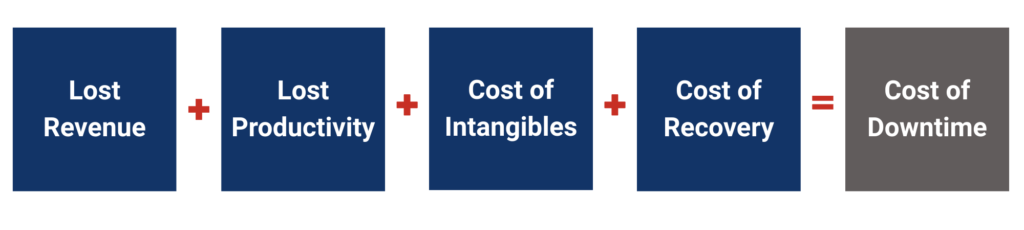
Many business owners underestimate downtime because they only think about lost sales, but the true cost is much bigger. Downtime includes lost revenue, recovery expenses, lost productivity, brand damage, and lost future opportunities.
You only need four numbers to understand your risk:
Calculate the total cost of downtime using this formula:
Downtime can’t be eliminated entirely, but you can reduce it dramatically with smart planning.
When you have a plan, you act faster and reduce losses.
Disasters, human error, and hardware failures happen, but your business shouldn’t stop when they do.
At DDKinfotech, our Data Backup and Continuity solutions are designed to quickly recover and keep your systems running.
We don’t just store copies of your files; we build safeguards that keep your team productive. DDKinfotech actively test backups, verify recovery processes, and build continuity plans that keep your business operating during disruptions.
Here’s how we help businesses maintain uptime and continuity:
Explore our Data Backup and Continuity to understand your downtime risk and how to reduce it.